How to run Real-ESRGAN on a Mac (Apple silicon)
Checked on November 9, 2026. Commands tested on an M5 Max running macOS 27. Local Upscale Studio is in development.
Real-ESRGAN is a free, open-source AI upscaler from 2021. It makes photos and video frames four times bigger and cleans up blur and compression on the way. It is the engine behind many free upscalers, and it runs well on Apple silicon. This guide covers four ways to run it, from a Terminal command to an app with no setup, and which model to choose for which job.
The quick answer
- No setup, photos only: Upscayl, a free app built on Real-ESRGAN.
- Comfortable with Terminal: the official ready-made
realesrgan-ncnn-vulkanprogram. No Python needed. - You write Python: PyTorch with Apple's MPS backend works, with two small changes.
- Photos and video in one Mac app: Local Upscale Studio's Fast mode, when it ships.
1. The official ready-made program (ncnn)
The Real-ESRGAN project publishes a portable command-line program for macOS. It runs on the GPU through Vulkan, so it needs no Python, PyTorch or CUDA. The latest macOS build is from April 2022, but it is a universal app with native Apple silicon code, and it ran without problems on our test Mac.
- Open the project's v0.2.5.0 release page and download realesrgan-ncnn-vulkan-20220424-macos.zip (about 50 MB). It contains the program and its models.
- Open the zip, then open Terminal and go to the folder. Type
cdwith a space, drag the folder into the Terminal window, and press Return. - Make the program runnable:
chmod u+x realesrgan-ncnn-vulkan - Upscale a photo 4×. Put the photo in the same folder first:
./realesrgan-ncnn-vulkan -i photo.jpg -o photo-4x.png -n realesrgan-x4plus
If macOS blocks it. The program isn't notarised by Apple, so when it comes from a web browser, macOS stops it from opening. In our test, a downloaded copy waited for a security prompt and never ran. Removing the download flag from that one file fixed it:
xattr -d com.apple.quarantine realesrgan-ncnn-vulkan
Only do this for a file you downloaded from the official release page. The included readme also suggests turning Gatekeeper off for the whole Mac; we don't recommend that.
Useful options
- Always choose the model with
-n. The macOS build's default is the anime video model, not the photo model. - A whole folder: make an empty output folder, then point
-iand-oat folders:mkdir upscaled; ./realesrgan-ncnn-vulkan -i photos -o upscaled -n realesrgan-x4plus -f jpg - Drawings and anime:
-n realesrgan-x4plus-anime. - 2× instead of 4×: the anime video model comes in 2×, 3× and 4× versions, chosen with
-s, for example-n realesr-animevideov3 -s 2. For photos, the simplest route is to upscale 4× and shrink the result in Preview. - Video: the program only reads images. Its readme shows the method: split the video into frames with ffmpeg, upscale the folder, then join the frames back up with the original audio. It works, but it needs a lot of disk space for the frames.
The readme warns that the program cuts large images into tiles and stitches them back together, which can leave faint seams and gives slightly different results from the Python version.
2. Python and PyTorch, on the Mac's GPU
If you already use Python, the realesrgan package runs all the models in the project's list, including realesr-general-x4v3, which the ncnn build for Mac doesn't include. We tested it in a fresh Python 3.12 environment:
python3 -m venv ~/realesrgan-env
~/realesrgan-env/bin/pip install torch torchvision realesrgan
Two things need fixing, and this is why we only recommend this route to people who write Python:
- It fails to import with current PyTorch. The
basicsrlibrary it depends on expects a module that newer versions of torchvision removed. Addingsys.modules["torchvision.transforms.functional_tensor"] = torchvision.transforms.functionalat the top of your script, before importingrealesrgan, fixed it for us. - It ignores the Mac's GPU by default. The project's
inference_realesrgan.pyscript only looks for an NVIDIA card, so on a Mac it falls back to the CPU. In your own script, passdevice=torch.device("mps")toRealESRGANer.
With those two changes, RealESRGAN_x4plus.pth from the release page ran on the M5 Max's GPU and gave essentially the same result as the ncnn program. Keep the environment in its own folder so you can delete it in one go; ours took about 1.2 GB.
3. Upscayl: an app built on Real-ESRGAN
Upscayl is a free, open-source app for upscaling photos. Its backend is a fork of the official ncnn program, and its readme says it uses Real-ESRGAN. It comes with several 4× models, including community models such as Remacri and UltraSharp. It needs macOS 12 or later. Download it free from GitHub, or pay $12.99 for the Mac App Store version. If you want Real-ESRGAN without Terminal, start here. It handles images only, not video.
4. Local Upscale Studio's Fast mode
Studio is a pay-once Mac app for photos and video, in development. Its Fast mode is Real-ESRGAN, using the same Core ML conversions that already run in the developer's App Store apps, Local Photo Upscaler and Local Video Upscaler. Core ML is Apple's own framework for running models, so there is no Terminal, Python or Vulkan to set up. It takes whole videos, with no frame folders to manage, and on our M5 Max development Mac it upscales video at tens of frames per second. A typical 16 GB Mac will be slower; we haven't measured one yet.
Studio also has a Quality mode built on newer models, for the jobs where Real-ESRGAN falls short (see below). It is $49 once at launch, rising to $79 at version 1.0. Nothing is uploaded and there is no account.
Which model for what
From the project's own model list:
| Model | Use it for | Where you get it |
|---|---|---|
RealESRGAN_x4plus (realesrgan-x4plus) | General photos. The default choice. | ncnn build, Python |
RealESRGAN_x4plus_anime_6B (realesrgan-x4plus-anime) | Anime and illustrations. A smaller network. | ncnn build, Python |
| realesr-general-x4v3 | General scenes when speed or memory matters. A tiny model with lighter deblurring and denoising, and a denoise-strength setting. | Python |
| realesr-animevideov3 | Anime video. Very small and fast; 2×, 3× or 4×. | ncnn build, Python |
The project also lists a 2× model (RealESRGAN_x2plus) and a smoother RealESRNet_x4plus for Python.
Its limits
- It smooths faces. On portraits and old family photos, skin, eyelashes and wrinkles often come out flat and waxy. The Python script can hand faces to a separate model, GFPGAN, with
--face_enhance; that is a different project with its own licence. - It is an older model. The main models date from 2021 and 2022, and the last release was in September 2022. Newer open models, such as SeedVR2, rebuild far more texture, at a much higher cost in time and memory.
- It looks at one image at a time. On video, each frame is upscaled on its own. Video models such as FlashVSR use the neighbouring frames as well.
- Heavy damage stays. Strong compression blocks and badly blurred footage often come out sharper but still damaged.
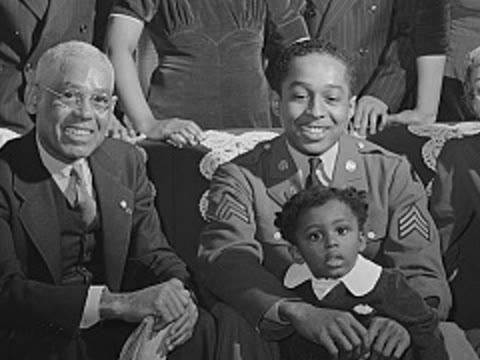
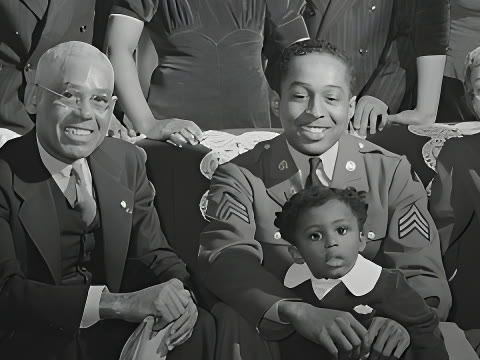
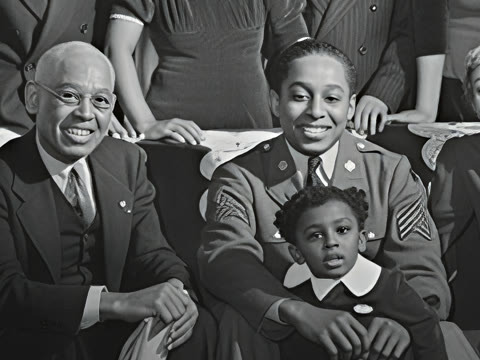
More comparisons, with speed and memory measured on our development Mac, are on the SeedVR2 and FlashVSR results page.
Licence
Real-ESRGAN's code is BSD-3-Clause, copyright 2021 Xintao Wang, which allows commercial use as long as the notice is kept. The ncnn program's own repository is MIT. The model weights are files on the project's release page with no separate licence of their own. The project's training notes say the models were trained on the DIV2K, Flickr2K and OST datasets; the DIV2K site says that dataset "is made available for academic research purpose only". Upscayl is AGPL-3.0. If you plan to build Real-ESRGAN into a product, read these yourself.
Questions
Does it work on an Intel Mac? The ncnn build includes Intel code too. This guide was tested on Apple silicon only.
Does it need the internet? No. We ran the ncnn program with network access blocked and it worked normally. See private, offline upscaling on a Mac.
Is Real-ESRGAN the best upscaler? It is fast, free and good on clean sources, but newer models do better on faces and badly degraded footage. See AI upscalers for Mac compared.
Guides: how to upscale photos on a Mac, upscaling video to 4K and old home videos.
Sources and credits
- Real-ESRGAN: github.com/xinntao/Real-ESRGAN, releases, model zoo, training notes, licence
- ncnn program: github.com/xinntao/Real-ESRGAN-ncnn-vulkan; README_macos.md inside the macOS zip
- DIV2K: data.vision.ee.ethz.ch/cvl/DIV2K
- Upscayl: github.com/upscayl/upscayl, upscayl-ncnn, Mac App Store listing
- 1942 portrait: U.S. Office of War Information, Library of Congress FSA/OWI collection, public domain. Upscaled.
Mac, macOS, Core ML and Preview are trademarks of Apple Inc. Real-ESRGAN is the work of Xintao Wang and contributors, who do not endorse Local Upscale Studio. Upscayl and all other names are trademarks of their owners. Local Upscale Studio is not affiliated with any of them.